Как заполнить документ данными из базы данных на C# и .NET
В современном программном обеспечении автоматизация процессов создания документов стала неотъемлемой частью разработки бизнес-решений. Часто возникает необходимость автоматически заполнять документы данными, хранящимися в базе данных, чтобы генерировать отчеты, сертификаты, договоры или другие формы документов. В этой статье мы рассмотрим, как выполнить такую задачу на C# и .NET, используя популярную библиотеку SautinSoft Document .NET.
Эффективность автоматизированного заполнения документов:
- Экономия времени. Создание сотен документов за секунды.
- Минимизация ошибок. Автоматическая вставка данных исключает человеческий фактор.
- Легкая масштабируемость. Можно расширять систему под любые требования бизнеса.
- Унификация оформления. Единый стиль и формат документов для всего предприятия.
Автоматизация формирования документов — одна из главных задач в области бизнес-процессов и корпоративных информационных систем. Особенно актуально в сфере финансов, логистике, HR, юриспруденции, где объем документов огромен и регулярный процесс подготовки.
Пошаговое руководство:
- Добавить SautinSoft.Document из Nuget.
- Передать содержимое (content) в параметр строки "db_content".
- Установить настройки Json.
- Загрузить шаблон для слияния содержимого с "db_content".
- Сохранить результирующий файл.
Входной файл:
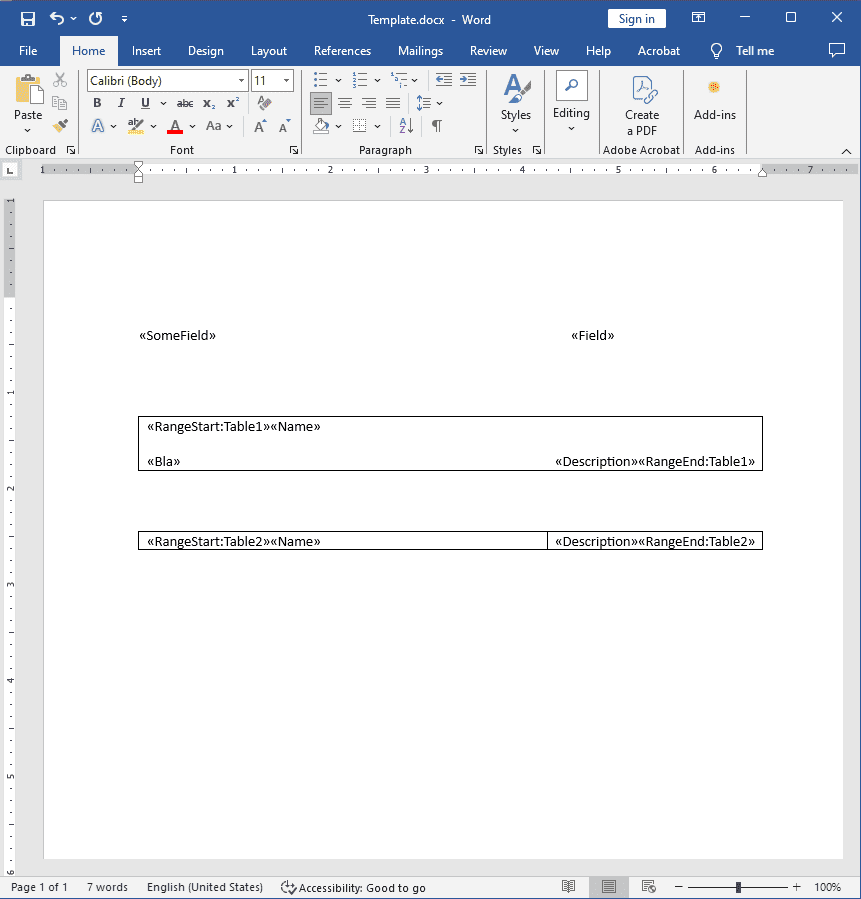
Выходной результат:
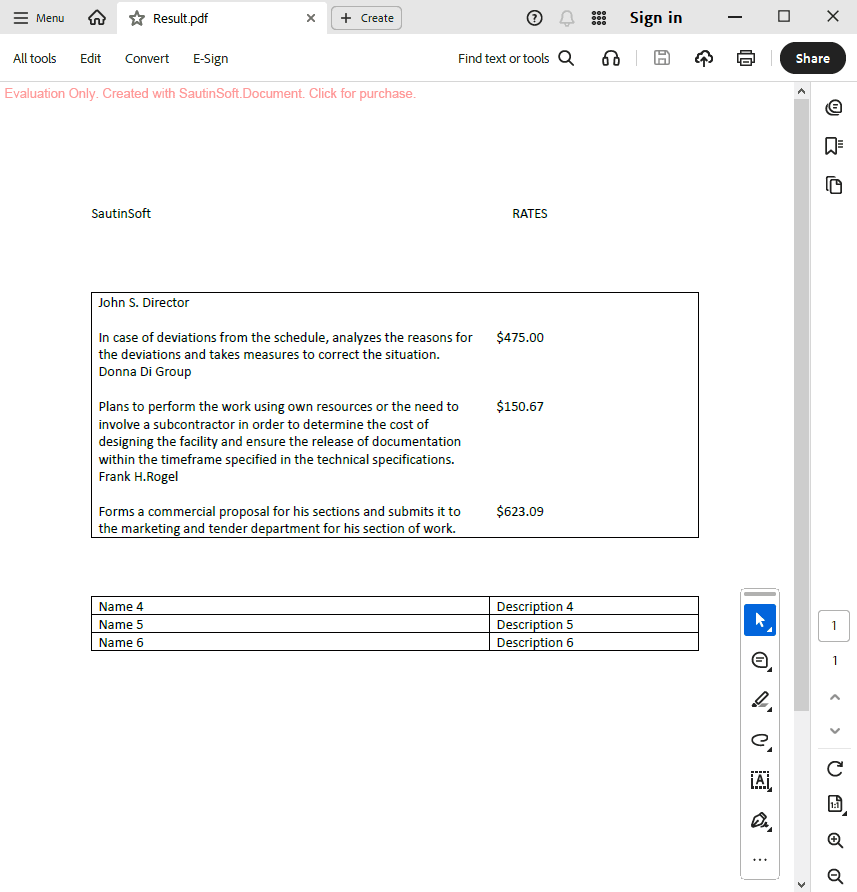
Полный код
 GitHub
using Newtonsoft.Json;
using Newtonsoft.Json.Linq;
using SautinSoft.Document;
using System;
using System.Collections.Generic;
using System.IO;
namespace Sample
{
class Sample
{
static void Main()
{
// Get your free trial key here:
// https://sautinsoft.com/start-for-free/
/// <summary>
/// Filling out a document from a database.
/// </summary>
/// <remarks>
/// Details: https://sautinsoft.com/products/document/help/net/developer-guide/read_content_from_db.php
/// </remarks>
string db_content = @"
{
'SomeField': 'SautinSoft',
'Field': 'RATES',
'Table1': [
{
'Name': 'John S. Director',
'Description': '$475.00',
'Bla': 'In case of deviations from the schedule, analyzes the reasons for the deviations and takes measures to correct the situation.'
},
{
'Name': 'Donna Di Group',
'Description': '$150.67',
'Bla': 'Plans to perform the work using own resources or the need to involve a subcontractor in order to determine the cost of designing the facility and ensure the release of documentation within the timeframe specified in the technical specifications.'
},
{
'Name': 'Frank H.Rogel',
'Description': '$623.09',
'Bla': 'Forms a commercial proposal for his sections and submits it to the marketing and tender department for his section of work.'
}
],
'Table2': [
{
'Name': 'Name 4',
'Description': 'Description 4'
},
{
'Name': 'Name 5',
'Description': 'Description 5'
},
{
'Name': 'Name 6',
'Description': 'Description 6'
}
]
}
";
var jsonSettings = new JsonSerializerSettings { Converters = { new JsonObjectConverter() } };
var jsonSource = JsonConvert.DeserializeObject<Dictionary<string, object>>(db_content, jsonSettings);
var document = DocumentCore.Load(@"..\..\..\Template.docx");
document.MailMerge.Execute(jsonSource);
document.Save(@"..\..\..\Result.pdf");
}
public sealed class JsonObjectConverter : JsonConverter
{
public override bool CanConvert(Type objectType)
{
return objectType == typeof(object);
}
public override object ReadJson(JsonReader reader, Type objectType, object existingValue, JsonSerializer serializer)
{
switch (reader.TokenType)
{
case JsonToken.StartObject:
return serializer.Deserialize<Dictionary<string, object>>(reader);
case JsonToken.StartArray:
var array = JArray.Load(reader);
var list = new List<Dictionary<string, object>>();
foreach (var item in array)
{
if (item.Type == JTokenType.Object)
list.Add(item.ToObject<Dictionary<string, object>>());
}
return list;
case JsonToken.String:
return reader.Value?.ToString();
case JsonToken.Integer:
case JsonToken.Float:
return Convert.ToDouble(reader.Value);
case JsonToken.Boolean:
return Convert.ToBoolean(reader.Value);
default:
var token = JToken.ReadFrom(reader);
return token.ToObject<object>();
}
}
public override void WriteJson(JsonWriter writer, object value, JsonSerializer serializer)
{
serializer.Serialize(writer, value);
}
}
}
}Option Infer On
Imports System
Imports System.IO
Imports System.Collections.Generic
Imports SautinSoft.Document
Imports System.Text.Json
Imports System.Text.Json.Serialization
Namespace Sample
Friend Class Sample
Shared Sub Main()
' Get your free trial key here:
' https://sautinsoft.com/start-for-free/
''' <summary>
''' Filling out a document from a database.
''' </summary>
''' <remarks>
''' Details: https://sautinsoft.com/products/document/help/net/developer-guide/read_content_from_db.php
''' </remarks>
Dim db_content As String = " {
""SomeField"": ""SautinSoft"",
""Field"": ""RATES"",
""Table1"": [
{
""Name"": ""John S. Director"",
""Description"": ""$475.00"",
""Bla"": ""In case of deviations from the schedule, analyzes the reasons for the deviations and takes measures to correct the situation.""
},
{
""Name"": ""Donna Di Group"",
""Description"": ""$150.67"",
""Bla"": ""Plans to perform the work using own resources or the need to involve a subcontractor in order to determine the cost of designing the facility and ensure the release of documentation within the timeframe specified in the technical specifications.""
},
{
""Name"": ""Frank H.Rogel"",
""Description"": ""$623.09"",
""Bla"": ""Forms a commercial proposal for his sections and submits it to the marketing and tender department for his section of work.""
}
],
""Table2"": [
{
""Name"": ""Name 4"",
""Description"": ""Description 4""
},
{
""Name"": ""Name 5"",
""Description"": ""Description 5""
},
{
""Name"": ""Name 6"",
""Description"": ""Description 6""
}
]
}"
Dim jsonOptions = New JsonSerializerOptions With {
.PropertyNameCaseInsensitive = True,
.Converters = { New JsonObjectConverter() }
}
Dim jsonSource = JsonSerializer.Deserialize(Of Dictionary(Of String, Object))(db_content, jsonOptions)
Dim document = DocumentCore.Load("..\..\..\Template.docx")
document.MailMerge.Execute(jsonSource)
document.Save("..\..\..\Result.pdf")
End Sub
Public NotInheritable Class JsonObjectConverter
Inherits JsonConverter(Of Object)
Public Overrides Function Read(ByRef reader As Utf8JsonReader, ByVal typeToConvert As Type, ByVal options As JsonSerializerOptions) As Object
' The objects ({}) are mapped as Dictionary<string, object>
' and arrays ([]) are mapped as List<Dictionary<string, object>>.
'INSTANT VB TASK: The following 'switch expression' was not converted by Instant VB:
' return reader.TokenType switch
' {
' JsonTokenType.StartObject => JsonSerializer.Deserialize<Dictionary<string,
' object>>(ref reader, options), JsonTokenType.StartArray => JsonSerializer.Deserialize<List<Dictionary<string,
' object>>>(ref reader, options),
' JsonTokenType.String => reader.GetString(),
' JsonTokenType.Number => reader.GetDouble(),
' JsonTokenType.True or JsonTokenType.False => reader.GetBoolean(),
' _ => JsonSerializer.Deserialize<object>(ref reader, options)
' };
End Function
Public Overrides Sub Write(ByVal writer As Utf8JsonWriter, ByVal value As Object, ByVal options As JsonSerializerOptions)
JsonSerializer.Serialize(writer, value, value.GetType(), options)
End Sub
End Class
End Class
End Namespace
Если вам нужен пример кода или у вас есть вопрос: напишите нам по адресу support@sautinsoft.ru или спросите в онлайн-чате (правый нижний угол этой страницы) или используйте форму ниже: